---
title: "Installing CHAT Widget - Devad CHAT Docs — Devad"
url: "https://st1.devad.io/help/en/docs/setup-basics/installing-chat-widget--99"
---
[Skip to content](https://st1.devad.io/help/en/docs/setup-basics/installing-chat-widget--99#main-content)
[](https://st1.devad.io)
[Home](https://st1.devad.io) [POST](https://devad.io/post) [CHAT](https://devad.io/chat) [SITE](https://devad.io/site) [AI](https://devad.io/ai-agent) [Pricing](https://st1.devad.io/pricing)
[](https://st1.devad.io/help#hc-search) [Agent view](https://st1.devad.io/help/en/docs/setup-basics/installing-chat-widget--99.md)
[Docs](https://st1.devad.io/help/en/docs/) [Guides](https://st1.devad.io/help/en/guides/) [Changelog](https://st1.devad.io/help/en/changelog/)
Browse these Docs
[12Ai Agentic Chatbot](https://st1.devad.io/help/en/docs/ai-agentic-chatbot/)
- [AI Agent & Chatbot for Automated Appointment & Booking System](https://st1.devad.io/help/en/docs/ai-agentic-chatbot/ai-agent-chatbot-for-automated-appointment-booking-system--2)
- [AI Basic Settings : Human takeover, Smart reply, & Troubleshooting](https://st1.devad.io/help/en/docs/ai-agentic-chatbot/ai-basic-settings-human-takeover-smart-reply-troubleshooting--26)
- [AI & Chatbot Builder](https://st1.devad.io/help/en/docs/ai-agentic-chatbot/ai-chatbot-builder--32)
- [Google Calendar & TidyCal Integrations with Chatbot](https://st1.devad.io/help/en/docs/ai-agentic-chatbot/appointments-with-google-calendar-or-tidycal--42)
- [AI & Chatbot Builder](https://st1.devad.io/help/en/docs/ai-agentic-chatbot/ai-chatbot-builder--172)
- [Flows Builder & External API](https://st1.devad.io/help/en/docs/ai-agentic-chatbot/flows-builder-external-api--72)
- [Google Integration & AI Features](https://st1.devad.io/help/en/docs/ai-agentic-chatbot/google-integration-ai-features--78)
- [AI Basic Settings : Human takeover, Smart reply, & Troubleshooting](https://st1.devad.io/help/en/docs/ai-agentic-chatbot/ai-basic-settings-human-takeover-smart-reply-troubleshooting--216)
- [OpenAI, Integrations, & Chatbot Training](https://st1.devad.io/help/en/docs/ai-agentic-chatbot/openai-chatbottidycal-flows-builder--218)
- [OpenAI, Integrations, & Chatbot Training](https://st1.devad.io/help/en/docs/ai-agentic-chatbot/openai-chatbottidycal-flows-builder--120)
- [Flows Builder & External API](https://st1.devad.io/help/en/docs/ai-agentic-chatbot/flows-builder-external-api--220)
- [Google Integration & AI Features](https://st1.devad.io/help/en/docs/ai-agentic-chatbot/google-integration-ai-features--226)
[View all Ai Agentic Chatbot](https://st1.devad.io/help/en/docs/ai-agentic-chatbot/)
[1CHAT App](https://st1.devad.io/help/en/docs/chat-devad-io-docs/)
- [User Management](https://st1.devad.io/help/en/docs/chat-devad-io-docs/user-management--165)
[5Features Use Cases](https://st1.devad.io/help/en/docs/features-use-cases/)
- [AI Agent & Chatbot for e-Commerce [ WooCommerce, shopify, Opencart & Others]](https://st1.devad.io/help/en/docs/features-use-cases/ai-agent-chatbot-for-e-commerce-woocommerce-shopify-opencart-others--10)
- [AI Agentic Chatbot Features](https://st1.devad.io/help/en/docs/features-use-cases/ai-agentic-chatbot--18)
- [Appointments, Reservations, and meeting Scheduling](https://st1.devad.io/help/en/docs/features-use-cases/appointments-reservations-and-meeting-scheduling--37)
- [Customer Support Features](https://st1.devad.io/help/en/docs/features-use-cases/customer-support-features--60)
- [Marketing Feautres for Any Business](https://st1.devad.io/help/en/docs/features-use-cases/marketing-feautres-for-any-business--105)
[View all Features Use Cases](https://st1.devad.io/help/en/docs/features-use-cases/)
[3POST App](https://st1.devad.io/help/en/docs/post-devad-io-docs/)
- [POST.devad.io Analytics Guides](https://st1.devad.io/help/en/docs/post-devad-io-docs/post-devad-io-analytics-guides--4)
- [POST.devad.io Features Guides](https://st1.devad.io/help/en/docs/post-devad-io-docs/post-devad-io-features-guides--12)
- [AI Agent Skill: one Prompt to Post Everywhere](https://st1.devad.io/help/en/docs/post-devad-io-docs/ai-agent-skill-one-prompt-to-post-everywhere--20)
[19Settings Area](https://st1.devad.io/help/en/docs/settings-area/)
- [Conversation Management System](https://st1.devad.io/help/en/docs/settings-area/conversation-management-system--163)
- [Articles & Tickets Sections](https://st1.devad.io/help/en/docs/settings-area/articles-tickets-sections--45)
- [Automations & Cron Job](https://st1.devad.io/help/en/docs/settings-area/automations-cron-job--48)
- [Department Settings & Configuration](https://st1.devad.io/help/en/docs/settings-area/department-settings-configuration--167)
- [Notifications Management](https://st1.devad.io/help/en/docs/settings-area/notifications-management--170)
- [Conversation Management System](https://st1.devad.io/help/en/docs/settings-area/conversation-management-system--57)
- [Department Settings & Configuration](https://st1.devad.io/help/en/docs/settings-area/department-settings-configuration--63)
- [Departments, Queue and routing](https://st1.devad.io/help/en/docs/settings-area/departments-queue-and-routing--66)
- [Email, Newsletter, SMS, & Notifications](https://st1.devad.io/help/en/docs/settings-area/email-notifications-sms--69)
- [Miscellaneous: More Features & settings](https://st1.devad.io/help/en/docs/settings-area/more-features-settings--184)
- [Language and Translations](https://st1.devad.io/help/en/docs/settings-area/language-and-translations--201)
- [Articles & Tickets Sections](https://st1.devad.io/help/en/docs/settings-area/articles-tickets-sections--203)
- [Departments, Queue and routing](https://st1.devad.io/help/en/docs/settings-area/departments-queue-and-routing--205)
- [Language and Translations](https://st1.devad.io/help/en/docs/settings-area/language-and-translations--102)
- [Automations & Cron Job](https://st1.devad.io/help/en/docs/settings-area/automations-cron-job--209)
- [Mobile App & Other Settings](https://st1.devad.io/help/en/docs/settings-area/mobile-app-other-settings--108)
- [Miscellaneous: More Features & settings](https://st1.devad.io/help/en/docs/settings-area/more-features-settings--111)
- [Mobile App & Other Settings](https://st1.devad.io/help/en/docs/settings-area/mobile-app-other-settings--212)
- [Notifications Management](https://st1.devad.io/help/en/docs/settings-area/notifications-management--117)
[View all Settings Area](https://st1.devad.io/help/en/docs/settings-area/)
[9Setup Basics](https://st1.devad.io/help/en/docs/setup-basics/)
- [Chat & Conversations](https://st1.devad.io/help/en/docs/setup-basics/chat-conversations--51)
- [Having problems?](https://st1.devad.io/help/en/docs/setup-basics/having-problems--81)
- [Plans & Pricing](https://st1.devad.io/help/en/docs/setup-basics/plans-pricing--193)
- [Users & Access](https://st1.devad.io/help/en/docs/setup-basics/users-access--195)
- [Chat & Conversations](https://st1.devad.io/help/en/docs/setup-basics/chat-conversations--197)
- [Having problems?](https://st1.devad.io/help/en/docs/setup-basics/having-problems--199)
- [Installing CHAT Widget](https://st1.devad.io/help/en/docs/setup-basics/installing-chat-widget--99)
- [Plans & Pricing](https://st1.devad.io/help/en/docs/setup-basics/plans-pricing--126)
- [Users & Access](https://st1.devad.io/help/en/docs/setup-basics/users-access--144)
[View all Setup Basics](https://st1.devad.io/help/en/docs/setup-basics/)
[10Whatsapp](https://st1.devad.io/help/en/docs/whatsapp/)
- [How to Create and Keep WhatsApp Business Account Healthy](https://st1.devad.io/help/en/docs/whatsapp/how-to-create-and-keep-whatsapp-business-account-healthy--153)
- [WhatsApp Templates & Flows](https://st1.devad.io/help/en/docs/whatsapp/how-to-use-whatsapp-templates-in-chat-devad-io--159)
- [Connect WhatsApp Business With CHAT.devad.io](https://st1.devad.io/help/en/docs/whatsapp/connect-whatsapp-business-with-chat-devad-io--54)
- [How to Connect WhatsApp Twilio to Chat.devad.io](https://st1.devad.io/help/en/docs/whatsapp/how-to-connect-whatsapp-twilio-to-chat-devad-io--84)
- [How to Create and Keep WhatsApp Business Account Healthy](https://st1.devad.io/help/en/docs/whatsapp/how-to-create-and-keep-whatsapp-business-account-healthy--87)
- [Setting Up Your 360dialog Account](https://st1.devad.io/help/en/docs/whatsapp/setting-up-your-360dialog-account--132)
- [WhatsApp Shop](https://st1.devad.io/help/en/docs/whatsapp/whatsapp-shop--228)
- [WhatsApp Shop](https://st1.devad.io/help/en/docs/whatsapp/whatsapp-shop--147)
- [WhatsApp Templates & Flows](https://st1.devad.io/help/en/docs/whatsapp/whatsapp-templates--148)
- [WhatsApp voice & video calls](https://st1.devad.io/help/en/docs/whatsapp/whatsapp-voice-video-calls--149)
[View all Whatsapp](https://st1.devad.io/help/en/docs/whatsapp/)
[5More Integrations](https://st1.devad.io/help/en/docs/more-integrations/)
- [WordPress Integration](https://st1.devad.io/help/en/docs/more-integrations/full-wordpress-integration--75)
- [How To Export and Import Users in CHAT.devad.io Safely](https://st1.devad.io/help/en/docs/more-integrations/how-to-export-and-import-users-in-chat-devad-io-safely--93)
- [More Integration: Slack, Opencart, Martfury, Zalo, Zendesk, Viber, Line, WeChat](https://st1.devad.io/help/en/docs/more-integrations/more-integration-slack-opencart-martfury-zalo-zendesk-viber-line-wechat--114)
- [OpenCart](https://st1.devad.io/help/en/docs/more-integrations/opencart--123)
- [Shopify Integration](https://st1.devad.io/help/en/docs/more-integrations/shopify-integration--135)
[View all More Integrations](https://st1.devad.io/help/en/docs/more-integrations/)
[3Facebook Instagram Messenger](https://st1.devad.io/help/en/docs/facebook-instagram-messenger/)
- [Messenger (Facebook & Instagram) Setup](https://st1.devad.io/help/en/docs/facebook-instagram-messenger/how-to-enable-messenger-facebook-instagram--90)
- [Reply Comments & DM for Comments](https://st1.devad.io/help/en/docs/facebook-instagram-messenger/reply-comments-dm-for-comments--129)
- [Reply Comments & DM for Comments](https://st1.devad.io/help/en/docs/facebook-instagram-messenger/reply-comments-dm-for-comments--233)
[2General](https://st1.devad.io/help/en/docs/general/)
- [Chat](https://st1.devad.io/help/en/docs/general/chat--96)
- [User Management](https://st1.devad.io/help/en/docs/general/user-management--141)
[1Telegram](https://st1.devad.io/help/en/docs/telegram/)
- [Telegram AI Agent & Chatbot Setup](https://st1.devad.io/help/en/docs/telegram/telegram-ai-agent-chatbot-setup--138)
[1Twitter X](https://st1.devad.io/help/en/docs/twitter-x/)
- [X (Twitter) AI Agent & Chatbot Setup](https://st1.devad.io/help/en/docs/twitter-x/x-twitter-ai-agent-chatbot-setup--150)
[4Ecommerce Features](https://st1.devad.io/help/en/docs/ecommerce-features/)
- [AI Agent & Chatbot for e-Commerce [ WooCommerce, shopify, Opencart & Others]](https://st1.devad.io/help/en/docs/ecommerce-features/ai-agent-chatbot-for-e-commerce-woocommerce-shopify-opencart-others--188)
- [Email, Newsletter, SMS, & Notifications](https://st1.devad.io/help/en/docs/ecommerce-features/email-notifications-sms--207)
- [AI Agentic Chatbot Features](https://st1.devad.io/help/en/docs/ecommerce-features/ai-agentic-chatbot--214)
- [Customer Support Features](https://st1.devad.io/help/en/docs/ecommerce-features/customer-support-features--239)
[View all Ecommerce Features](https://st1.devad.io/help/en/docs/ecommerce-features/)
[2Lead Gen Features](https://st1.devad.io/help/en/docs/lead-gen-features/)
- [Google Calendar & TidyCal Integrations with Chatbot](https://st1.devad.io/help/en/docs/lead-gen-features/appointments-with-google-calendar-or-tidycal--222)
- [Appointments, Reservations, and meeting Scheduling](https://st1.devad.io/help/en/docs/lead-gen-features/appointments-reservations-and-meeting-scheduling--224)
[1Marketing Features](https://st1.devad.io/help/en/docs/marketing-features/)
- [Marketing Feautres for Any Business](https://st1.devad.io/help/en/docs/marketing-features/marketing-feautres-for-any-business--237)
[1Business Themes](https://st1.devad.io/help/en/docs/business-themes/)
- [Business Page Templates](https://st1.devad.io/help/en/docs/business-themes/business-page-templates--34)
[19Portraits](https://st1.devad.io/help/en/docs/portraits/)
- [How to Create Editorial Portrait 4k for Free](https://st1.devad.io/help/en/docs/portraits/how-to-create-editorial-portrait-4k-for-free--3)
- [Viral Gemini AI Prompts Ready to Copy & Paste for Portraits: The Ultimate Cinematic Men’s Fashion Collection](https://st1.devad.io/help/en/docs/portraits/viral-gemini-ai-prompts-ready-to-copy-paste-for-portraits-the-ultimate-cinematic-mens-fashion-collection--19)
- [Viral Gemini AI Prompts Ready to Copy & Paste for Portraits, Studio Fashion, and Graphic Art](https://st1.devad.io/help/en/docs/portraits/viral-gemini-ai-prompts-ready-to-copy-paste-for-portraits-studio-fashion-and-graphic-art--27)
- [Viral Gemini AI Prompts Ready to Copy & Paste for Portraits of Men and Majestic Horses](https://st1.devad.io/help/en/docs/portraits/viral-gemini-ai-prompts-ready-to-copy-paste-for-portraits-of-men-and-majestic-horses--33)
- [Viral Gemini AI Prompts Ready to Copy & Paste for Portraits, Cinematic Art, and Surreal Fashion Photography](https://st1.devad.io/help/en/docs/portraits/viral-gemini-ai-prompts-ready-to-copy-paste-for-portraits-cinematic-art-and-surreal-fashion-photography--38)
- [Viral Gemini AI Prompts Ready to Copy & Paste for Portraits, Cozy Interiors, and Cinematic Morning Vibes](https://st1.devad.io/help/en/docs/portraits/viral-gemini-ai-prompts-ready-to-copy-paste-for-portraits-cozy-interiors-and-cinematic-morning-vibes--43)
- [Viral Gemini AI Prompts Ready to Copy & Paste for Portraits, Cinematic Men’s Fashion, and Photorealistic Lifestyle Shots](https://st1.devad.io/help/en/docs/portraits/viral-gemini-ai-prompts-ready-to-copy-paste-for-portraits-cinematic-mens-fashion-and-photorealistic-lifestyle-shots--46)
- [Viral Gemini AI Prompts Ready to Copy & Paste for Portraits, Lifestyle, and Professional Branding](https://st1.devad.io/help/en/docs/portraits/viral-gemini-ai-prompts-ready-to-copy-paste-for-portraits-lifestyle-and-professional-branding--49)
- [Viral Gemini AI Prompts Ready to Copy & Paste for Portraits, Epic Adventures, and Cinematic Landscapes](https://st1.devad.io/help/en/docs/portraits/viral-gemini-ai-prompts-ready-to-copy-paste-for-portraits-epic-adventures-and-cinematic-landscapes--52)
- [Viral Gemini AI Prompts Ready to Copy & Paste for Portraits, 3D Optical Illusions, and Urban Surrealism](https://st1.devad.io/help/en/docs/portraits/viral-gemini-ai-prompts-ready-to-copy-paste-for-portraits-3d-optical-illusions-and-urban-surrealism--55)
- [Viral Gemini AI Prompts Ready to Copy & Paste for Portraits, High-Fashion Editorials, and Cinematic Urban Styles](https://st1.devad.io/help/en/docs/portraits/viral-gemini-ai-prompts-ready-to-copy-paste-for-portraits-high-fashion-editorials-and-cinematic-urban-styles--58)
- [Viral Gemini AI Prompts Ready to Copy & Paste for Portraits, High-Fashion Streetwear, and Surreal Editorials.](https://st1.devad.io/help/en/docs/portraits/viral-gemini-ai-prompts-ready-to-copy-paste-for-portraits-high-fashion-streetwear-and-surreal-editorials--61)
- [Viral Gemini AI Prompts Ready to Copy & Paste for Portraits, High-Fashion Editorials, and Vogue-Style Covers](https://st1.devad.io/help/en/docs/portraits/viral-gemini-ai-prompts-ready-to-copy-paste-for-portraits-high-fashion-editorials-and-vogue-style-covers--64)
- [Viral Gemini AI Prompts Ready to Copy & Paste for Portraits, Cinematic Travel, and Realistic Lifestyle Shots](https://st1.devad.io/help/en/docs/portraits/viral-gemini-ai-prompts-ready-to-copy-paste-for-portraits-cinematic-travel-and-realistic-lifestyle-shots--67)
- [Viral Gemini AI Prompts Ready to Copy & Paste for Portraits, High-Fashion Editorials, and Cinematic 3D Art](https://st1.devad.io/help/en/docs/portraits/viral-gemini-ai-prompts-ready-to-copy-paste-for-portraits-high-fashion-editorials-and-cinematic-3d-art--70)
- [Viral Gemini AI Prompts Ready to Copy & Paste for Portraits, Luxury Styles, and Creative Avatars](https://st1.devad.io/help/en/docs/portraits/viral-gemini-ai-prompts-ready-to-copy-paste-for-portraits-luxury-styles-and-creative-avatars--73)
- [Viral Gemini AI Prompts Ready to Copy & Paste for Portraits: Men’s Fashion & Coastal Luxury Styles](https://st1.devad.io/help/en/docs/portraits/viral-gemini-ai-prompts-ready-to-copy-paste-for-portraits-mens-fashion-coastal-luxury-styles--79)
- [Viral Gemini AI Prompts Ready to Copy & Paste for Portraits, Fine Art Photography, and Cinematic Editorials.](https://st1.devad.io/help/en/docs/portraits/viral-gemini-ai-prompts-ready-to-copy-paste-for-portraits-fine-art-photography-and-cinematic-editorials--91)
- [Viral Gemini AI Prompts Ready to Copy & Paste for Portraits, Featuring Iconic Cairo Tower Vistas and Elegant Hijab Fashion.](https://st1.devad.io/help/en/docs/portraits/viral-gemini-ai-prompts-ready-to-copy-paste-for-portraits-featuring-iconic-cairo-tower-vistas-and-elegant-hijab-fashion--94)
[View all Portraits](https://st1.devad.io/help/en/docs/portraits/)
[4Profiles](https://st1.devad.io/help/en/docs/profiles/)
- [Viral Gemini AI Prompts Ready to Copy & Paste for Profile, Cinematic Lighting, and Luxury Editorials.](https://st1.devad.io/help/en/docs/profiles/viral-gemini-ai-prompts-ready-to-copy-paste-for-portraits-cinematic-lighting-and-luxury-editorials--76)
- [Viral Gemini AI Prompts Ready to Copy & Paste for Profile Photos, Cinematic Street Style, and Moody Aesthetics](https://st1.devad.io/help/en/docs/profiles/viral-gemini-ai-prompts-ready-to-copy-paste-for-profile-photos-cinematic-street-style-and-moody-aesthetics--82)
- [Viral Gemini AI Prompts Ready to Copy & Paste for Professional Photos, LinkedIn Profiles, and Fashion Styles](https://st1.devad.io/help/en/docs/profiles/viral-gemini-ai-prompts-ready-to-copy-paste-for-professional-photos-linkedin-profiles-and-fashion-styles--85)
- [Viral Gemini AI Prompts Ready to Copy & Paste for Professional Profiles, Men’s Style, and LinkedIn](https://st1.devad.io/help/en/docs/profiles/viral-gemini-ai-prompts-ready-to-copy-paste-for-professional-profiles-mens-style-and-linkedin--88)
[View all Profiles](https://st1.devad.io/help/en/docs/profiles/)
[17Products](https://st1.devad.io/help/en/docs/products/)
- [Viral Gemini AI Prompts Ready to Copy & Paste for High-Converting Resistance Bands Product Photography](https://st1.devad.io/help/en/docs/products/viral-gemini-ai-prompts-ready-to-copy-paste-for-high-converting-resistance-bands-product-photography--97)
- [Viral Gemini AI Prompts Ready to Copy & Paste for Pop-Art Geometric Pizza Product Style for E-commerce](https://st1.devad.io/help/en/docs/products/viral-gemini-ai-prompts-ready-to-copy-paste-for-pop-art-geometric-pizza-product-style-for-e-commerce--100)
- [Viral Gemini AI Prompts Ready to Copy & Paste for Cinematic Gaming Headset Product Styles](https://st1.devad.io/help/en/docs/products/viral-gemini-ai-prompts-ready-to-copy-paste-for-cinematic-gaming-headset-product-styles--103)
- [Viral Gemini AI Prompts Ready to Copy & Paste for Romantic Feminine Lipstick Flat Lay Style for E-commerce](https://st1.devad.io/help/en/docs/products/viral-gemini-ai-prompts-ready-to-copy-paste-for-romantic-feminine-lipstick-flat-lay-style-for-e-commerce--106)
- [Viral Gemini AI Prompts Ready to Copy & Paste for Bright Energetic Home Workout Product Style for E-commerce](https://st1.devad.io/help/en/docs/products/viral-gemini-ai-prompts-ready-to-copy-paste-for-bright-energetic-home-workout-product-style-for-e-commerce--109)
- [Viral Gemini AI Prompts Ready to Copy & Paste for Trendy Outfit Grid Product Style for E-commerce](https://st1.devad.io/help/en/docs/products/viral-gemini-ai-prompts-ready-to-copy-paste-for-trendy-outfit-grid-product-style-for-e-commerce--112)
- [Viral Gemini AI Prompts Ready to Copy & Paste for Macro Backlit Keyboard Product Style for E-commerce](https://st1.devad.io/help/en/docs/products/viral-gemini-ai-prompts-ready-to-copy-paste-for-macro-backlit-keyboard-product-style-for-e-commerce--115)
- [Viral Gemini AI Prompts Ready to Copy & Paste for Copy-Paste AI Image Prompts: Ultra-Detailed Macro Gourmet Truffle Product Style for E-commerce](https://st1.devad.io/help/en/docs/products/viral-gemini-ai-prompts-ready-to-copy-paste-for-copy-paste-ai-image-prompts-ultra-detailed-macro-gourmet-truffle-product-style-for-e-commerce--118)
- [Viral Gemini AI Prompts Ready to Copy & Paste for Macro Technical Armrest Product Style for E-commerce](https://st1.devad.io/help/en/docs/products/viral-gemini-ai-prompts-ready-to-copy-paste-for-macro-technical-armrest-product-style-for-e-commerce--121)
- [Viral Gemini AI Prompts Ready to Copy & Paste for Technical Macro Suitcase Wheel Product Style for E-commerce](https://st1.devad.io/help/en/docs/products/viral-gemini-ai-prompts-ready-to-copy-paste-for-technical-macro-suitcase-wheel-product-style-for-e-commerce--124)
- [Viral Gemini AI Prompts Ready to Copy & Paste for Intricate Mechanical Watch Product Style for E-commerce](https://st1.devad.io/help/en/docs/products/viral-gemini-ai-prompts-ready-to-copy-paste-for-intricate-mechanical-watch-product-style-for-e-commerce--127)
- [Viral Gemini AI Prompts Ready to Copy & Paste for Artistic Macro Burning Wick Product Style for E-commerce](https://st1.devad.io/help/en/docs/products/viral-gemini-ai-prompts-ready-to-copy-paste-for-artistic-macro-burning-wick-product-style-for-e-commerce--130)
- [Viral Gemini AI Prompts Ready to Copy & Paste for Moody Pinterest Aesthetic Sofa Product Style for E-commerce](https://st1.devad.io/help/en/docs/products/viral-gemini-ai-prompts-ready-to-copy-paste-for-moody-pinterest-aesthetic-sofa-product-style-for-e-commerce--133)
- [Viral Gemini AI Prompts Ready to Copy & Paste for Chic Beauty-Influencer Hair Dryer Flat Lay Product Style for E-commerce](https://st1.devad.io/help/en/docs/products/viral-gemini-ai-prompts-ready-to-copy-paste-for-chic-beauty-influencer-hair-dryer-flat-lay-product-style-for-e-commerce--136)
- [Viral Gemini AI Prompts Ready to Copy & Paste for Futuristic Cyberpunk Smartphone Product Photography](https://st1.devad.io/help/en/docs/products/viral-gemini-ai-prompts-ready-to-copy-paste-for-futuristic-cyberpunk-smartphone-product-photography--139)
- [Viral Gemini AI Prompts Ready to Copy & Paste for Calming Conceptual Skincare Jar Product Style for E-commerce](https://st1.devad.io/help/en/docs/products/viral-gemini-ai-prompts-ready-to-copy-paste-for-calming-conceptual-skincare-jar-product-style-for-e-commerce--142)
- [Viral Gemini AI Prompts Ready to Copy & Paste for Mini Fashionista Flat Lay Product Style](https://st1.devad.io/help/en/docs/products/viral-gemini-ai-prompts-ready-to-copy-paste-for-mini-fashionista-flat-lay-product-style--145)
[View all Products](https://st1.devad.io/help/en/docs/products/)
[1Content](https://st1.devad.io/help/en/docs/content/)
- [How to use the Best & Cheapest AI Content Writing Tool AI.devad.io](https://st1.devad.io/help/en/docs/content/how-to-use-the-best-cheapest-ai-content-writing-tool-ai-devad-io--11)
## Browse these Docs
[Help Center](https://st1.devad.io/help/en/) › [Docs](https://st1.devad.io/help/en/docs/) › [Setup Basics](https://st1.devad.io/help/en/docs/setup-basics/) › Installing CHAT Widget
Docs
# Installing CHAT Widget
Installation Options for Live CHAT widget Getting CHAT.devad.io up and running on your site is designed to be flexible, regardless of your technical setup. Whether you are running a WordPress site, a custom-coded applic...
### **Installation Options for**Live CHAT widget
Getting CHAT.devad.io up and running on your site is designed to be flexible, regardless of your technical setup. Whether you are running a WordPress site, a custom-coded application, or managing your scripts through third-party tools, there is an integration method that fits your workflow.
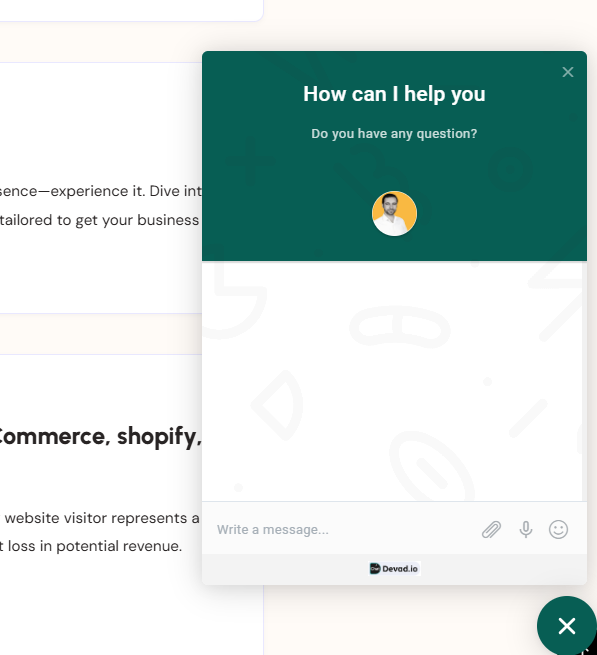Live CHAT Widget example
Choose the method below that best suits your environment:
- **WordPress Plugin:** The recommended choice for WordPress users. This dedicated plugin allows for deep integration, offering features like automatic user syncing, multisite routing, and visibility control based on page IDs or post types.
- **Any Website (Manual Setup):** A universal solution for non-WordPress sites or developers who prefer full control. This involves adding a simple Javascript snippet directly to your site’s HTML or theme files.
- **Tag Manager & Cloudflare:** Ideal for marketers and performance optimization. Use Google Tag Manager to sync with other tracking tools, or utilize Cloudflare Zaraz for the cleanest, fastest installation without touching your website’s code.
**Select the tab below that matches your preferred installation method to get started.**
WordPress Plugin
Any website
Tag Manager
Step 1**: Installation & Setup**
Follow these steps to get the **CHAT.devad.io** plugin running on your WordPress site.
- **Download:** Get the latest version of the plugin from **[here](https://chat.devad.io/docs/files/CHAT-devad-io.zip)**
- **Upload:** Log in to your WordPress Admin. Go to **Plugins > Add New > Upload Plugin**. Choose the file named `CHAT-devad-io.zip` and click **Install Now**.
- **Activate:** Once the upload is finished, click the **Activate** button.
- Locate Settings: After activation, a new menu item named CHAT.devad.io will appear in your sidebar. You can also find the settings page directly at :*yourwebsite.com***/wp-admin/options-general.php?page=CHAT-devad-io**
- **Go Live:** By default, the chat is automatically shown on all pages of your site once configured.
---
### Step 2: Finding Your Chat ID & Configuring Settings
To connect your specific account to your WordPress site, you need to link it using your unique ID.
### How to find your Chat ID
- Go to your [CHAT.devad.io Account Installation tab](https://chat.devad.io/account/?tab=installation) .
- Look for the **Embed Code** section.
- In the script code provided, look for the numbers at the end of the URL.**Example:** In
~~~
~~~
, your ID is **55747**.
- **Copy** that ID and **Paste** it into the **Chat ID** field in your WordPress plugin settings, then click **Save**.
### Understanding the Plugin Settings
Once you’ve entered your ID, you can fine-tune how the chat behaves:
| Setting | What it does |
| --- | --- |
| Visibility | Choose specific Page IDs or Post Type slugs (like “product” or “blog”) where the chat should (or shouldn’t) appear. |
| Multisite Routing | For WordPress Networks. It automatically sends chats to specific departments that match your Site ID. |
| Sync WP Users | Automatically identifies logged-in WordPress users so they don’t have to type their name/email into the chat. |
| Force Language | Manually sets the chat language (e.g., “en” or “fr”) to override automatic detection. |
| Feedback Notices | Options like Rate it now or Dismiss allow you to manage the plugin’s feedback notifications in your dashboard. |
If you prefer not to use the dedicated WordPress plugin, you can install the chat manually by adding the script snippet directly to your website’s code. This is often called the “Manual” or “Javascript” installation.
Here are the three most common ways to do it, depending on your setup:
Method 1: Using a “Headers and Footers” Plugin
This is the most common way for WordPress users. It ensures your chat stays active even if you change your theme.
- Install a plugin like **WPCode**.
- Go to **Code Snippets > Header & Footer**.
- Paste the snippet into the **Footer** box:HTML
~~~
~~~
- Hit **Save**.
---
### Method 2: Manual HTML Installation
Use this if you are not using WordPress or prefer to edit your theme files directly.
- Open your site’s main template file (e.g., `footer.php`, `index.html`, or `theme.liquid`).
- Locate the closing `` tag at the bottom.
- Paste the code **directly above** it:HTML
~~~